Saturday, 17 January 2015

AVG Antivirus 2015 + Crack (Serial) Free Download

AVG Antivirus is an "Grisoft's" Product. Whose main purpose is to totally remove the virus from pc or Laptop. The fullform of AVG is " Antivirus Guard". 
AVG was launched in 1992 and in 1997 after 5 years licence we sold of AVG Antivius at Germany & UK. In 1998 AVG was introduced in U.S.
So, now today I am providing you this simple free AVG antiviruss 2015 with serial crack free.


How to remove shortcut virus from pendrive !


We all are using usb drives or pendrives in our day to day life. And in that many of my readers faced problem that all their folders and files in their pendrive automatically converts in to an shortcut file. And from one pendrive this shortcut virus is spread from one usb to another usb via same pc. So don't give your usb to your friends whose pc is infected with virus.

If already your pendrive is been infected with this shortcut virus then don't worry I am gonna showing you the best two tricksto get rid out of this trouble. It is surely tested by our team and both the tricks works as well.


HOW THIS VIRUS COME IN USB ?

Usually this is an malware which is only spread from the pc which in injected with this virus. If this type of pendrive goes into your pc the another pendrive you will enter in your pc would be automatically infected by this virus. So be aware and remove this virus from your usb as soon as possible,


WHAT IS THE FUNCTION OF THIS VIRUS ?

If your pendrive/usb is infected by this virus then what ever you add in your pendrive for eg any game or any software then  would be converted to an shortcut format. All the folders would also be converted to an shortcut format. In short all the things inside your pendrive will be converted to an shortcut file.


TRICK-1 (Best among all)
======================

USING USBFIX.EXE


About usbFix
----------------------

UsbFix is one of the top rated shortcut virus remover with more than 3000000 million users. It is fast free and powerful. It is a fast infection treatment system and infection found by this software are automatically sent to its development center for further update. It will not only remove shortcut virus but also remove malware from your USB disk. UsbFix vaccinate your USB against further virus attack and creating shortcuts. Learn more about USBFIX software.


HOW TO USE USBFIX ?

  1. Connect your pendrive with your pc or laptop.
  2. Now download usbfix software from above provided link.
  3. It's an zip file so unzip it in your pc or laptop. 
  4. Now double click on it to install it in your pc.
  5. After installing it will be automatically opened up.
  6. Now click on research to search for virus in your pc and in pendrive.
  7. After it is completed if your pendrive has virus it will show you an virus.
  8. Simply click on CLEAN to remove the virus.
  9. Then click on vaccinate to prevent safe your USB drive from further viruses.
  10. That's it now you will find that your shortcut virus has been succesfully removed from your pc and from your usb drive.


TRICK-2 (without using software)
==================================


WITH THE HELP OF CMD
-----------------------------------------

  • At first open the Run option
  • (Press Windows Key+R).

  • Then type CMD in Run and press Enter then a dialog box will open. 
  • Now if your pendrive's Drive letter is G then typeG: in the dialog box and press Enter.
  • Now again type 

attrib -h -r -s /s /d g:\*.* 

  • And press Enter.
  • (Replace the g with your Pendrive letter)
  • Now you pen-drive will be OK.


Both this tricks are been tested. BUT I would only recommend you to use the 1st trick as it is the best trick and successfully tested trick. Well it depends upon you now. The choice is yours select any trick from the provided one.

Drop down a comment if you fall down in any trouble...)
Stay with Latest pc solutions for more new IT topics...

Download Net protector 2014 antivirus crack free


I was thinking to share this crack before only. But just I forgot to post this crack. Anyway today I just remembered to share this crackand thus I am sharing this crack today.

When for first time a pc came in my home. (Before 10 years)   this antivirus Net protector was provided free with 1 years of licence. I used it for over 8 to 9 months. And I would be having no words to explain with its amazing features. It has well monitored my pc. And my pc was very much safe from viruses, trojans and worms. But the fact is that I was not having an internet connection at that time and so I was unable to update, then too I used it and then too my pc was safe. 

Then after 1 year my subscription period was over and when I talked to the company they said that you need to renew your subscribtion at only 700 RS. I refused and started finding the crack. One I got from all was really working and that I am sharing today with you.


HOW TO INSTALL

  1. Download it from the above provided link.
  2. Now install Net protector 2014 setup in your pc.
  3. And disconnect your internet from pc.
  4. Open the crack.exe and install it in the location given below
  5. C:/program files/Net protector 2014
  6. And it will ask that new licence key found at c.
  7. Simply click on yes.
  8. And now open your net protector 2014 antivirus.
  9. Horay!!! It is cracked for few years.


Feel free to update your antivirus !!!


Use this crack as it is not a virus. And it will not harm your computer atall.


BONUS TIPS

  • Before using crack copy the update files as after using crack update files will not work. So you can replace update files after using crack.
  • After using this crack when you will open your antivirus a name would be coming that -cracked by bla bla bla. To remove that before using crack copy the folder names zvba or similar to that. There would be two or three files in that. Then use crack and replace that folder. Done!!!


Stay with Latest pc solution for more new IT topics...

Top 5 Antivirus 2014 !!!


Every one has a pc or laptop in their home. With the more increase in the uses of pc viruses have also been increased and are spreaded all over the world from usb, online threats, various malware apps, softwares containing a virus, etc., but with the increase in viruses there are a huge number of antivirus developed for the better protection of the pc.

No mind that many of the antivirus are itself a virus or trojans so its now our responsibility to select a proper and better antivirus which will really protect the pc and also monitoring the pc all over. So be safe of free antivirus, not all but few antivirus are a trojans. Be safe and protect your pc.

I have an some best antivius which I would like to share a review on it that will really protect your pc from virus, malware, trojans, etc. I have mentioned the best and the top antivirus according to me which are really best all over the world.
Top-1 (Best from all)
WINDOWS DEFENDER
(Inbuilt in windows 8)
Microsoft has launched a windows o.s. version windows8 or 8.1. And if you are using windows 8 then I advise don't use any of the antivirus as in windows 8 a best antivirus Windows defender which is inbuilt in windows 8.
Believe me it is the best antivirus in windows 8 from microsoft. Ya many of don't like it because of slow speed and regular updates but if you use it once in a week or with in 15 days then your pc will run smoothly then any other antivirus. 
I personally use this antivirus and after comparing it with many other antivirus I found that it is the best among all. It is best than Bitdefender, norton, netprotector, kaspersky, avast, avg, avira and all other from my personal experience.
If you are using windows 7 or xp then you can use MSE which is same antivirus as defender from microsoft itself only. Check out - Mse (microsoft securitt essential) and also (How to install MSE in windows xp).

Top-2 (Quit good performance)

This one is also a quite good antivirus for better protecting your pc if you have windows vista, 7 or xp as if you have 8 then go for the top 1 antivirus. Ya this is the 2nd best antivirus as I have used my self fora2 months.
If you regularly update this antivirus then your pc would be safe from all the antivirus. It is best antivirus but first you have to buy it and thats not good but if you have money then go for this. The problem with this antivirus is that  it stops bluestacks from installing and it uses more power supply and it will give more load to your pc and hence your pc would be slower but safe from virus.
You may also like :- Bitdefender 2014 crack

Note:- Use this crack in safe mode

Top-3 (Loved by indians)

The best antivirus which get respect more in india. All love use this antivirus in india and on over 75-80 % users of India uses Quick heal total security. Indian users are giving this antivirus more respect then any other. My over all the friends purchase this antivius but if I use this antivirus then I don't purchase it as I love to crack it.
I have used this antivirus for almost 6 months before. It has many features which allows a user to remove the junk files and some unwanted files which will really boost up your computer speed x2. You can get its crack from google itself by searching there.


Top-4 (Best ever security)

I have used this antivirus for 2 months free trial when I got a new pc. I used its 2012 version in my pc and has almost many new features like parental controls, website checking, quick scan , full scan, etc. You can also exclude some files from scanning. Many cracks are available and I have used them to crack.
I was really surprised using it, as it was my first antivirus I used in my life. I still can not forget it. You can also have a check on your facebook as this antivirus can also scan your facebook images, videos etc from malwares and trojans. Search for a crack on google for that.
You may also like :- Norton 2014 free crack
Top-5 (Handy and easy to use)
Avast 2014 has many new features which helps a user to clean more virus from its computer and also a system reboot scan at syatem start up which will remove the unwanted files and virus from your computer.
For this antivirus you can use licence keys to activate this antivirus in your pc. Also a licence key file to activate this. Still it has many new features and will surely protect & well monitor your pc thus I am reccomending you this antivirus.
You may also like :- Avast 2014 crack till 2050

So these were few best antivirus accordig to me. If you have windows 8 then don't need any antivirus and if you have any other os (operating system) then you can use MSE too as it is as same as defender. No mind this two are the common and should be used but you can also use any other with this two antivirus in your pc which will really protect your pc.
Share your reviews about this...)
Stay with Latest pc solution for more new IT topics...

How to install MSE in windows xp

    
As I always tell that MSE has the most tighten security and is the most reiable antivius in the world than any other antivius.  Its made by the microsoft company itself. So it has the better scanning facilities and well monitors your pc than any other.

Though its an best antivirus than any other but it has one problem that it is not installing in windows xp. Which users dont like often. So today I would be providing you some of the tools with that you can install MSE in windows xp too.

In windows 7 you can easily install MSE but in windows xp it shows error while installing. If you want to install it in windows xp then install the few three files provided below in your pc and then install your MSE.


In windows 8 you don't need this antivirus as in windows 8 there is already an strong antivirus as compared MSE. So dont install it in windows 8.

Stay with Latest pc solution for more new IT topics...

Avast 2014 crack till 2050


Avast 2014 (v9) latest crack and including lots of licence key free download here. Crack works till 2050 and some licence key till 2015 and some licence key till 2060. I have collected cracks and licence keys from many places and today sharing out with you.
  1. Type - Antivirus software
  2. Licence - Freemium
  3. Website - avast.com
  4. Developers - s.r.o
  5. Operating system - windows 2000, xp, vista, 7, windows 8 (x86 x64),  mac , android.

Avast is an best third party antivirus which has won many of the awards in best security system. Today I would sharing the crack of it which is 100 % working on avast 2014. I have collected different licence keys and cracks from different sites & also have tested all. Lets have an look at its performances.

  • File shield-Real time protection
  • Web shield-HTTP protection
  • P2P shield-Scan p2p files
  • Anti-spyware capabilities
  • Anti-rootkit capabilities
  • Virus chest -Quarantine
  • Intelligency-on
  • Silent firewall-against hackers
  • Data shredder-on
  • Network protectiom-on
Contents inside file

  1. Avast v9 crack
  2. Avast 2014 licence key & crack
  3. Avast licence key till 2015

Type = zip

Size = 1.74 MB

  • How to use it

  • Firstly download avast v9 2014 crack from above link.
  • Now extract it to desktop using winzip as it is an zip file.
  • You can use any of the crack inside it.
  • If you use licence key then avast will be activated till 2015.
  • And crack works till 2050.

Thats it you have avast 2014 activated till 2050 or 2015. It protects your pc and well monitors your pc. But still I would only like to reccomend you to only use MSE and windows defender as they are the best antivirus in the world then any other.

Stay with Latest pc solution for more new IT topics...

MSE (microsoft security essential) best antivirus

      
There is no way to be secured from virus & malwares. Today we would be talking about an simple but powerfull antivirus in the world. It is the top most and the best antivirus found in the world, MSE (microsoft security essential).

All the computers have some viruses present in their system. Well you may also like to check about the trick to remove the autorun.inf virus from your usb or from your pc.

You all use different types of antivirus such as net protector, kaspersky, Avg, Avast, Avira,Norton! Quick heal, etc. they all are third party antivirus they all can not well monitor your pc compared to MSE. So I reccomend for removing all third party antivirus and use this best ever antivirus.

Every year you need to purchase new license. But if you use Microsoft Security Essentials (MSE), then you are free from all of these problems. This is the fastest, lightest, safest and more reliable Antivirus I've ever seen.  
Features
  • Easy to use
  • Full Free*
  • Fast, safe and reliable
  • Real-time protection
  • System scanning
  • System cleaning
  • Windows Firewall integration
  • Dynamic signature service
  • Rootkit protection
  • Protection against real threats, not good software
  • Network inspection system

Your windows must be genuine to use this antivirus..
Click here to download Microsoft Secutiry Essential
Click here to download offline updates for it.
If installing it in windows xp it shows error then plz first install the three files provided below before installing MSE.
Stay with Latest pc solution for more new IT topics...

Check the performance of your antivirus


IS YOUR ANTIVIRUS WORKING CHECK IT NOW !!!

If you are using Mse (Microsoft security essential) and wd (Windows defender), then there is no need of checking its performance. But if you are using any third party antivirus like avast, net protector, nlrton, quick heal, kaspersky, avira, avg, eset.,etc. then you should check that is it working and protecting your pc properly or not.

Today I will provide you an simple and small sample virus. Which will not at all harm your pc. Just test it. Many of the users buy third party antivirus to protect there pc and some of them use trial version. But how much safe you are? Is it really protecting your pc? Is your pc safe from virus? Lets check it !!!
  1. Go to run by pressing start + run.
  2. Type Notepad and hit Enter.
  3. Copy and paste the following code in notepad.
  4. Now save the file as virus.exe
  5. Scan it with your antivirus.

X5O!P%@AP[4\PZX54(P^)7CC)7}$EICAR-STANDARD-ANTIVIRUS-TEST-FILE!$H+H*
If your antivirus mark it as an virus means your antivirus is protecting and well monitoring your pc perfectly. If not then you need to remove your third party antivirus and use MSE or windows defender.

Both MSE and Windows defender have tight security compared to any third party antivirus. As they are prepared from the microsoft itself. So I would like to reccomend you to use MSE or Windows defender only. If you hae any third party antivius then remove it.

I have also checked this by windows defender. And defender catched this virus wihout scaning it. Thus, I recommend you to use only MSE or winfows defender. 

Defender report this file as...
  
  • Item Name: Virus:DOS/EICAR_Test_File
  • Category: VirusAlert 

  • Level: Severe

  • Description: This program is dangerous and replicates by infecting other files

  • Recommended Action: Remove this software immediatley
If you are not aware that what is virus then let me tell you it is an simple code which can easily destroy your pc and can damage or corrupt your files with an ease. The fullform of virus is given below.
VIRUSVital Information Resources Under Seize
If I say true this fullform was in my computer text book..

Official Kitkat v4.4 OS for pc free download


Official Android Kitkat 4.4 R1 O.S in pc is now easily available. Jut now you can use Android kitkat 4.4 os in your Pc or Laptop. Its simple to install it in pc just follow up the instruction provided below.


How to use ?

  1. Mount / Burn The .ico Image File To CD/DVD
  2. Install It Like Windows, With Boot Menu
  3. And Enjoy.
Size= 343Mb


How to unroot your Android device

Yesterday I shared easiest & and best possible ways to root your Android device using some appropriate and suitable applications in your Android device.

There are lots of apps available in the market which can help you to root and unroot your android device. Some are paid apps and many are free apps. Some of the apps which would help you to unroot your phone are listed below.


How to unroot your Phone ?


Now, there are two methods or you can say two apps which can unroot your phone. Usually there are many apps but I have tested in two of them which are below.

Trick-1 Using Universal Unroot
======

Universal Unroot is an totally free app available in the market which allows users to unroot there android device with an ease. Also this app supports many devices and so there is no need to check the compability for any oofthe device.


How to use Universal Unroot ?

  • First of all simply download Universal Unroot -(Download here).
  • Now install it in your android as usual you do in your phone.
  • Then you need to open the app in your android.
  • Now follow up the procedure provided inside the app to simply unroot your phone again.
  • If you feel you wanna root your phone then check here -How to root any android without using pc.


Download -Universal Unroot


Trick-2 Using Super Su 
======

You might be aware with this app if you have already rooted your phone. You can also Unroot your phone with the help of this simple app which is available free in the market.


How to use Super Su ?

  • Download & install Super Su in your Android.
  • Now open it in your Android Device.
  • Then open settings in Super Su.
  • Scroll Down and click on Full unroot option.
  • Then click Continue and reboot your device.
  • When it boots up simply uninstall Super Su app.


That's it now your device has been unrooted successfully. If you wanna Root it again then check here-How to Root your android without using pc.

How to Root any Android Device without any pc or computer


Now a day's Rooting is an very much common thing. And mostly 50 % of the users are aware about the rooting process. But there are many beginners who wanna learn and become expert while using android tricks. No worry I will now only share my best experience about some android tricks.

Before moving ahead with the process of rooting you mind would be asking you severe questions that what this rooting is ? What it would help me ? & will it going to harm my phone or not ?. Don't worry I am explaining you all its advantages and disadvantages.
Now, what is Rooting ?

Rooting is the process of allowing users of Android smartphones, tablets, and other devices to gain root access in your device. In the simple words it means that a user can go beyond and can have the Superuser permission. And a user can go beyond the limitations of an android. 

So, after to root an Android device, users have the ability to alter or replace system applications and settings, run specialized apps that require administrator-level permissions, or perform other operations that are otherwise inaccessible to a normal Android user. On Android, rooting can let many users the complete removal and replacement of the device’s operating system version, usually with a more recent release of its current operating system (known as custom ROM).


Advantages of Rooting an Android device ?

First and foremost, rooting allows the customizations since like it allows the installation of Custom ROMs in the phone. 
Allows you to convert file systems from the laggy RFS to the speedy EXT4.
Allows you to remove the system apps which come by default with the phone.
Allows you to apply lots of other customizations
And also Allows you to make your own desired android phone by modding it.


Disadvantages of Rooting ?

There is only one disadvantage of Rooting, which is that it voids your warranty.
But no problem at all because you can also unroot your phone.


How to Root an Android Device ?

There are many one click apps available in the market with that you can root your android device with just an single click. Some of the apps I have listed below.


1) Framaroot ( Best of all )

This app has an ability to root most of the android device with an single click.


How to use framaroot ?

  1. First of all download Framaroot from above link.
  2. Now you need to install it in your android.
  3. In case if antivirus shows it as a virus simply ignore it,
  4. Believe me it is not virus and will not harm your device at all.
  5. Now enable "USB debugging mode" from Settings > Developer option.
  6. It is not necessary to enable but it wood be better if you enable that.
  7. Now open your framaroot app and click on the button to root.
  8. Your device would be rebooted and congrats you have an rooted device.


2) Towel root (Needs internet)
I would still advice you to first use framaroot if not successfull then go for towel root. No mind Towel root has been used by Millions of people and you can give a trust to this app but framaroot supports more devices than it.


How to use towelroot ?

  1. Firstly download the app from above listed link.
  2. Now enable USB Debugging mode from setting > Developer option.
  3. Then install towel root in your android device.
  4. Make sure your device is connected to Internet.
  5. Then click on the middle button named "make it ra1n" and wait if your device is compatible, if it is then it will automatically rooted.
  6. Towelroot is tested by me on samsung galaxy S5.


So this were the best two methods I provided you for rooting your Android device with an ease and in an easy manner. 

Drop an comment below with your device name if its rooted with this apps as it makes me happy !! I know that many of your devices would be rooted....and before posting I have tested framaroot on 4 different devices.

How to increase & boost RAM in Pc


Hello guys, today I am going to show you an amazing trick to boost up and increase the RAM in your pc or laptop. Previously I have shared an trick to increase RAM in android. -How to increase and boost RAM in android. First read below which RAM are we going to increase.


Which RAM would increase ?

Basically RAM are of two types. Physical RAM & Virtual memory. Physical RAM is the RAM which you usually buy and fix up in your Mother Board like 2gb, 2.5 gb..., while virtual RAM is totally different concept. Virtual RAM utilisies both hardware and software. It is the conjuction of both and remember that it is the main part to increase your pc's speed.


More about Virtual RAM

Virtual Memory technology uses your Main Physical Computer RAM in conjunction with your Hard disk space (Temporary space).You can have a look at the main concept behind the Virtual RAM Mechanism below and read the step by step tutorial on How to Increase PC RAM Virtually Windows.

How virtual RAM works ?

Whenever you run heavy applications or program’s and your RAM runs low then the Virtual Memory phenomenon comes into action which transfers data from RAM to a space called paging file and thus freeing up your RAM and there by Increasing Your RAM.


How to increase RAM in Pc ?

  • Move to My computer -> Right click -> Select Properties.

  • Click on "Advanced Sytem Settings". -See below image.


  • System properties would be opened up now.

  • Move to Advanced Tab & under performance tab click on settings. -See below image.


  • Now "Performance option" should be opened up.

  • Again click on advanced tab and click on Change. -See below image.


  • Now Uncheck the Box ‘Automatically manage paging file size for all drives’.


  • Select Your Windows Drive :C and Click on Custom size and Set the Initial Size and Maximum Size to 5000 i.e 5 GB -See below image.

  • Note:- The more size you provide the more RAM will release but make sure you change your size depending on your hard disk.

Plz Read First

By using this trick your RAM would be increased boosting up your computers Programs and applications. It is 100% safe and reversible too. So you can easily undo the changes if you are not satisfied with the results.
Stay with Latest pc solution for more new IT topics...

How to use multiple whatsapp accounts in android


I have got may requests for providing any of the trick to run multiple whatsapp accounts on an single android phone. How ever officially there could be only 1 account used in android but today I will show you to run multiple whatsapp accounts on 
Android.
Now there are two options to use multiple accounts on an android. One by rooting your phone & other without rooting. I would recommend first for second method as its very much easy and you also don't need to root your android.

How to use Multiple whats app accouts on android ?


Method-1: Without Rooting

We would be doing so without rooting your phone. There is no need to root your phone. We would take help of an simple app called "OGwhatsapp". Which is the unofficiall version or duplicate version of whats app.


What is OGWHATSAPP ?
It is the modded version of whatsapp. It is the unofficial version of whatsapp but works like the normal version of whatsapp. It is similar to whatsapp. And you can use two whatsapp in your android without rooting & thats all we need.


How to use OGWHATSAPP ?

  • Firstly open up your whatsapp in android and take backup of your conversations as shown below:

  • Go to Settings -> Applications > ALL -> Select Whatsapp -> Select Clear Data as shown below.

  • After clearing the data move to /sdcard/WhatsApp and rename it to /sdcard/OGWhatsApp.
  • Now just uninstall the whatsapp from your android.
  • Now install OGWHATSAPP -Download here.
  • Thats it now OGWHATSAPP will use your old phone number.
  • Now to make an secondary account download official whats app from playstore and install it.
  • Here now you can use new number for an new account.

Method -2 :Requires rooting

This is very second method which requires rooting. You could create multiple whatsapp accounts very easily but you need to first root your phone using "Framearoot" app. We would be using an app named "Titanium Backup Root".


How to use Titanium backup root ?


  • Now select create a new data profile as shown below :

  • And enter name of your first user profile which would be your main whats app administrator.
  • And then create a second profile with some other name.
  • Two profiles would be created, so now click on swith profile and select your second profile user name.
  • Click on Backup/Restore and search for the whatsapp application.
  • Click on it and click on Special Features tab and browse for disable multi profile for this app option, you need to disable this option.

  • And then again enable this option.
  • Now register with second number for your second account.

I hope this information was sufficient enough to run multiple whatsapp accounts in android. If you need further any help then drop down an comment I will try my best to solve your problem.


Stay with Latest pc solution for more new IT topics...

How to install windows xp in android


So guys, you wanna install original windows xp in your android phone. Then today I will show you an easiest way to do so. It is not any launcher of windows xp but it is original same as in pc. It is quite simple and yet easy to do so.

We all might have used windows xp in pc. And now you can also run windows xp in your android phone. Its simple and easy if you can get all my steps I provided below. So, lets get started.


Requirements
=============


How to install Windows xp in android ?

  1. Create an SDL folder in your sdcard.
  2. Now copy c.img to that SDL folder :-sdcard/SDL/c.img
  3. Now extract the SDL.zip file  which you downloaded from above link in android.
  4. And copy all the files to that SDL folder.
  5. Run Bochs.apk in your android and your windows xp would loadup within next 30 minutes.
  6. Just don't do any thing and after 30 minutes you will find xp installed in your android.
  7. That's all now you have windows xp in your android.
  8. Enjoy !!!

Windows

Plz note:- If windows xp's screen does not fit with your android then you can use Nlite to resize your windows xp.

Also check out the below provided video only just for the demo.
Watch this tutorial

THX TO XDA DEVELOPERS FOR THIS WONDERFUL SHARE


Now you have windows xp installed in your android. If you face any problem then watch above video or comment below I will try my best to solve it. And if you liked my work ten don't forget to drop down a comment.


Stay with Latest pc solution for more new IT topics...

How to recover forgotten android password using pc


Hello friends, its been a long time I havent edited my site with any blog post. So today I am gona sharing an amazing post to recover your lost password in your android.


You may also like:- How to increase RAM in android.


We all use android smart phone. And all might be aware that if you lost your android password then your phone is of no use. It can be only use as a flash torch at the night time. But no after reading this post you would be easily able to recover your lost password or security code.

All you need to do is to follow the simple easy steps and then you can easily retrive back your lost security code or password from your android smart phone . Let's take a look on the requirements for this purpose.
REQUIREMENTS


  1. A computer
  2. A android phone
  3. Mobile data cable
  4. A software


How to recover lost security code from android.


  • Firstly from pc you need to download a software -Download here.
  • Now install that software in pc and open it.


  • Now connect your mobile with pc using Datacable.


  • In that software select your connection and phone type.


  • Now simply click on READ anf boom you got your security code of your android phone.
That's it now you got your lost security code. Enjoy and drop down a comment below if you really liked my work. 

Stay with Latest pc solutions for more new IT topics...

Install Android kitkat v4.4 on any android device.


So guys !! You wanna upgrade/update your android smart phone to kitktat v4.4. Then here today you can. Now you can have the same features of kitkat v4.4 straight in your android device.

As many of you have requested me for this update, here I am sharing the trick to update your phone to kitkat v4.4. And remember that this is not laucher but this will oriinally convert your phones feaures and apps to kitkat v4.4. If you don't want t update your phone to kitkat v4.4 then try kitktat v4.4 launcher.


HOW I DID THIS ?

Its so simple. My friend had an Nexus 5 at his home. I took it for few minutes and I started a backup of all the apps of kitkat v4.4 on nexus 5. Then afterwards I copied all apps to my android device. And uploaded to media fire link. So now if you want full kitkat v4.4 on your android you just have to download the file and one by one install all 13 different apps. But  make sure before that your device is rooted, if not then first root your phone.


You may also like:- How to increase RAM in android


CONTENTS INSIDE FILE
======================

ALL APPS OF NEXUS 5 (KITKAT V4.4)

  1. Calculator.apk
  2. Googlecamera.apk
  3. Deskclockgoogle.apk
  4. Emailgoogle.apk
  5. Gmail2.apk
  6. GoogleHome.apk
  7. Velvet.apk
  8. PrebuiltGmsCore.apk
  9. HangOuts.apk
  10. Maps.apk
  11. Com.android.vending-4.4.22.apk
  12. Com.google.android.exchange-6.0-893803.apk
  13. com.google.android.inputmethod.latin-2.0.19003.893803a.apk
  14. Nexus 5 wallpapers (FOLDER)


You may also like:- Install Backtrack OS in android


HOW TO INSTALL IT IN YOUR ANDROID.

  1. Make sure that your phone is rooted.
  2. After that download the kitkatv4.4 update from above link.
  3. Now extract it on your sd card.
  4. One by one open all folders and start installing all apps.
  5. There are total 13 apps and 9 wallpapers of nexus 5.
  6. And also select any better wallpaper from provided one.
  7. After installing all apps just reboot (Restart) Your android device.
  8. And boom you have nexus 5 apps as well as update of kitkat 4.4 in your android.
  9. Enjoy and make comments below !!!
  10. So simple it is !!!

Now you have kitkat v4.4 updated apps in your android. Feel free to ask any wuestions regarding this, I will try my best to sort it out. Android update v4.4.3 is cancelled and its replaced by v4.5 lolipop.


Stay with Latest pc solution for more new IT topics... 

How to Increase & Boost up RAM in android


Are you fed up from slow performance in your android device. if your android has less RAM and you open up few applications in once then your android device freeze and experience some slower performance.

Android devices are available in the range from Rs 4000 go Rs 40, 000, which possess very higher RAM. Though every one can not afford to buy those higher ranging devices which has higher performance and definately better RAM.

Many of the users goes gor the Mid range of smart phone and later on suffer from the problrms of low RAM. So the users experiencing this problem don't need to worry now. As I am providing some best apps which will genuinly help you for better and higher RAM in your android device.

Today I am going to share few applications which will boost up your android RAM and you can open multi task apps at once, if your device has a better ram. So you need to go for this trick which genuinly works.

Running on low RAM feels very irritating for every user. Even there are many shutdown and hanging problems caused due to less RAM in android device. But now no more shutdown or hanging problems anymore in anddoid pones. As I am showing best tricks to improve your andeoir ram.


No Root Require


REQUIREMENTS

  • Sd card with class 4 or higher
  • As slow speed sd card or poor sd cards can not be used.
  • Android smaet phone or tablet.
  • Ram increaser application.
  • Apps which can improve your android RAM

Even though you may fine thousands of apps which claims to increase your android ram but probably many of them are fake. I am only providing TESTED & VERIFIED apps.


APP NO. -1

Smart RAM Booster

This app really kills the slow optimize process. And this apps comes in different 4 modes.

Aggressive, strong, medium and gentle

Download and install smart ram booster in your android -Install smart RAM booster


APP NO. -2

Memory Booster

An another similar ram which helps to boost your ram by killing the slow processor. This app is same as smart ram booster.

One click memory optimization and much more.


Download and install memory booster in your android now. -Install memory booster


I hope now your slow performance RAM problem has been solved now. But if still problem persists then do comment below. I will try my best to help you.


Stay with Latest pc solution for more new IT topics...

Share computer's internet with android -Reverse tethering


In last 7 days more than 10 people have asked to me for sharing their computers internet connection with android. How every one is familiar with tethering. Tethering is donemto share your android's internet with pc.

Its not possible to directly share pc internet to android without wifi. But today I will show you an simple trick with which you can do that wihout wifi, but only with an USB cable. Its fairly easy and also wothwhile to do so.


WHAT YOU WILL NEED ?


  1. A rooted Android Device
  2. A PC
  3. A USB cable
  4. USB Driver
  5. Reverse Tether Zip
Before moving ahead make sure one thing. That you have the ADB USB drivers installed in your pc. If not then CLICK HERE to download usb drivers. And CHECK HERE the method to install the usb drivers. And also check one thing that your phone is rooted. If your phone is not rooted then search it on google -How to root a (samsung galaxy) ~replace with your android model.


SHARING COMPUTER INTERNET CONNECTION WITH ANDROID...


STEP -1

In your android device, move to settings -> Developers -> USB debugging and enable USB debugging in your android. If you cant find any developer option in your phone then move to about phone and tap on build number multiple times. It will prompt you that you are an 
Developer.

STEP -2

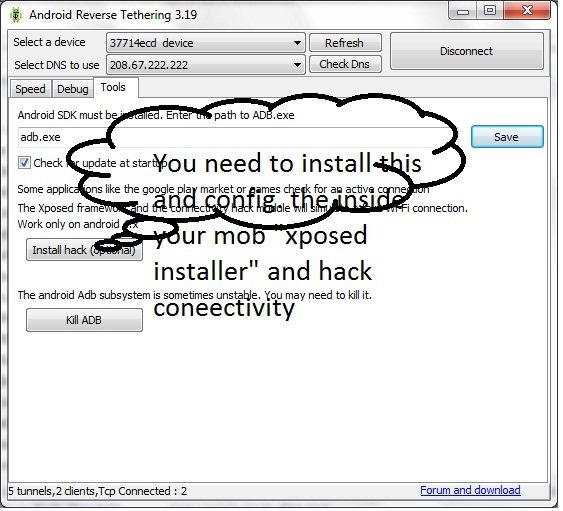
Now in your pc, download and extract Reverse tether.zip. Right click on Android tool app and select Run as administrator.

STEP -3

Make sure that you have already connected your android device with pc. In that app if your device serial key is displayed along with IP adress then you can click on connect.


STEP -4

On your device, an app should launch and you should see green check marks indicating that internet launched successfully on your device. Thats it!!! Your android device is connected with your pc's internet connection.


BASIC PROBLEM OCCURED -WITH SOLUTION


After connecting your device with internet you can easily enjoy your internet on your android. But many users informed me that some apps can't access the internet. So to solve the problem click on Internet hack (optimal) button on that app.


Thats it now you have full access to android from pc's internet. Feel free to post a commet below.